Shot detection
The shot detection is simply performed by thresholding the difference between the analyzed picture and a reference picture taken without the shot. This is performed by the function data_treat.objectExtract.filter_val() .
-
data_treat.objectExtract.filter_val(pic, width, height, tol=20.0)[source]¶ Compute the barycenter of a point cloud which pixel grey value is above a given threshold
Parameters: - pic – picture array grey values
- width – picture width
- height – picture height
- tol – filter tolerance (default 20)
Returns: barycenter x and y coordinates and the number of pixels detected

Adjusting the threshold is generally sufficient to obtain a relatively good shot position estimation on the camera, despite the simplicity of teh approach.
The function data_treat.objectExtract.compute_2d_traj() extracts the shot trajectory for every pictures given for a camera
-
data_treat.objectExtract.compute_2d_traj(cam, splitSymb='_', numsplit=-1, plotTraj=True, isgui=False)[source]¶ Compute the 2D trajectory (in m) of the barycenter of a moving object filmed by a camera, by computing the difference of images with the object and without the object (initial state)
Parameters: - cam – camera object
- splitSymb – symbol to use to split the picture names (default “_”)
- numsplit – place of the image number in the picture name after splitting (default -1)
- plotTraj – TRue or False, indicate if the detected point should be plotted
Returns: X,Y trajectory in the camera reference system and the time list
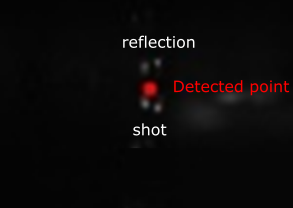
In certain cases, reflection in the sample’s surface can induce deviation in the detected trajectory. A simple fix is to mask the part of the image displaying the sample. This is possible by setting the mask_w and mask_h values of the camera object to the wask width (starting from the left of the picture) and height (starting from the bottom of the picture). This can be performed using the data_treat.cam.Cam.set_mask() of the camera object.
-
data_treat.cam.Cam.set_mask(self, mask_w, mask_h)¶ Set black mask to apply on each picture to remove reflexive surfaces
Parameters: mask_h (mask_w,) – mask width and height in pixels